Features
Everything your school needs to track, understand, and respond to student behavior.
Built by a classroom teacher. No feature bloat — just the tools schools actually reach for, day after day.
Incident logging
Fast, structured, and tied to real behavior codes — not free-text guesswork.
Behavior & Work Ethic — kept separate
Behavior marks and work ethic marks are tracked independently. A student who struggles with effort but not
conduct tells a different story than one who disrupts. ConductIQ keeps both stories straight.
- Behavior codes are fully customizable per school
- Mark and merit types clearly distinguished
- Comment-only entries for context without a mark
AM/PM split — built in
Every incident is logged as AM or PM. A pattern that appears only in the afternoon points to a different
root cause than one that spans the whole day. ConductIQ splits the day at your school's natural transition
point — not a fixed 12:00.
- AM and PM totals tracked independently
- Split point set to match your school's schedule, not the clock
- Time-of-day breakdown visible on the dashboard
- Feeds into progress monitoring metrics
Substitute coverage entry
Assign a coverage teacher and generate a time-limited link for substitute incident entry. Sub submissions
are reviewed before becoming official incidents — so the record stays accurate.
- Time-gated public form — no login required for subs
- Staff reviews and approves or rejects each entry
- Approved incidents are indistinguishable from normal entries in reports
Gradebook
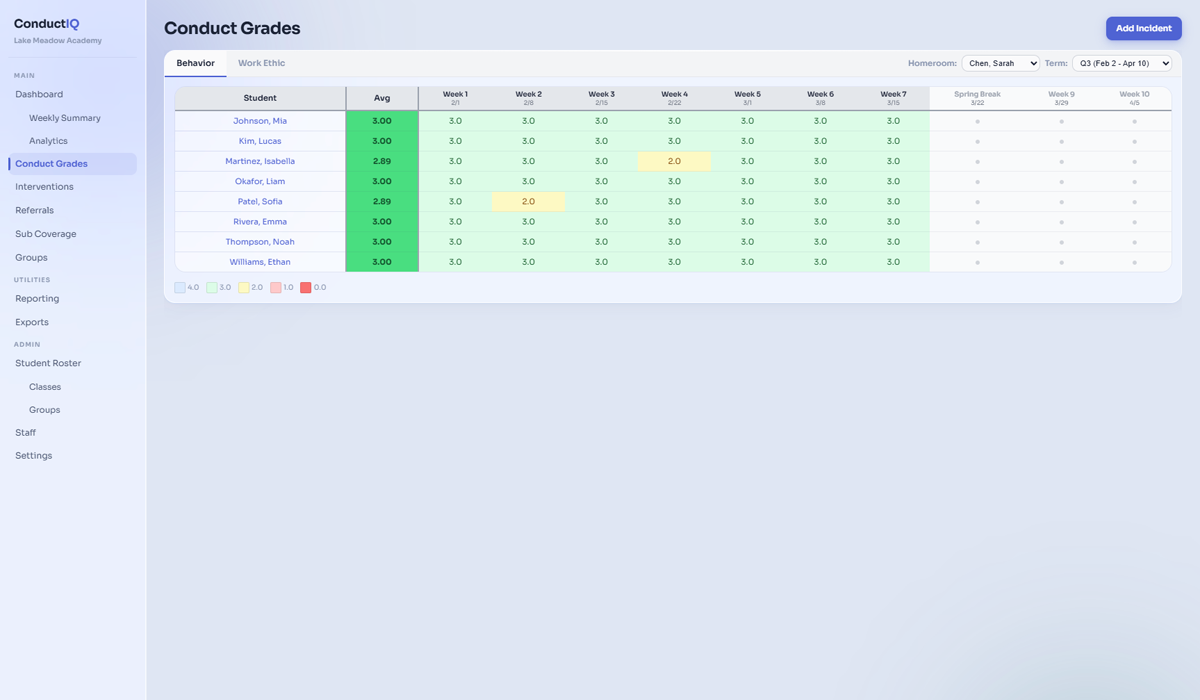
A week-by-week view of each student's mark and merit counts, grades, and consequence status for the
current term. Organized by homeroom for teachers; full-roster for admins and counselors.
- Behavior and Work Ethic tabs
- Grading scale applied automatically (Traditional or Standards-based)
- Consequence thresholds highlighted by week
Cross-classroom dashboard
When teachers share a student, they all see the same real-time picture — no more "I didn't know."
Shared daily view
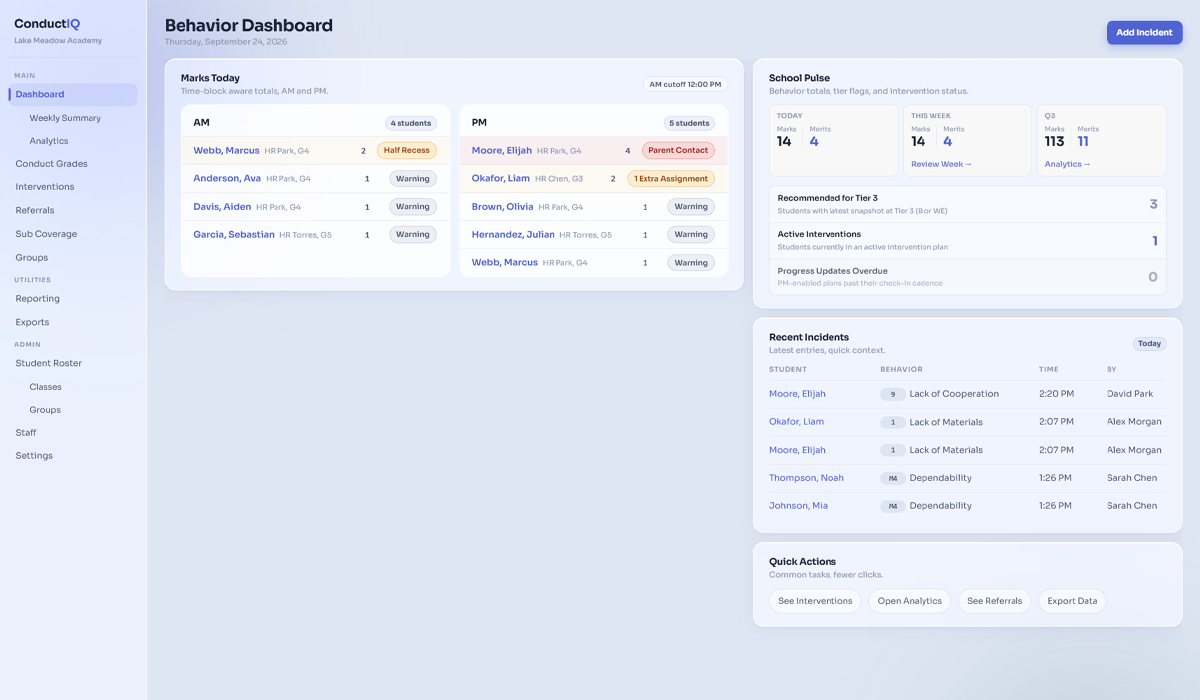
The dashboard shows each student's AM and PM mark count for the current day, updated in real time as
teachers log incidents. In a departmentalized school, every teacher who works with a student sees the same
data for that student.
- AM/PM marks visible at a glance
- Consequence thresholds flagged automatically
- Duty toggle for teachers covering a grade level or schoolwide
Weekly summary
The weekly summary shows mark and merit totals by day, rolling 20-day trends, and most frequent behavior
codes — giving teachers a quick sense of what the week looked like before meeting with students or
parents.
- Day-by-day breakdown for the current week
- 20-day trend line
- Most frequent behavior codes ranked
Risk monitoring & interventions
Automatic early warning, then everything you need to act on it — in one place.
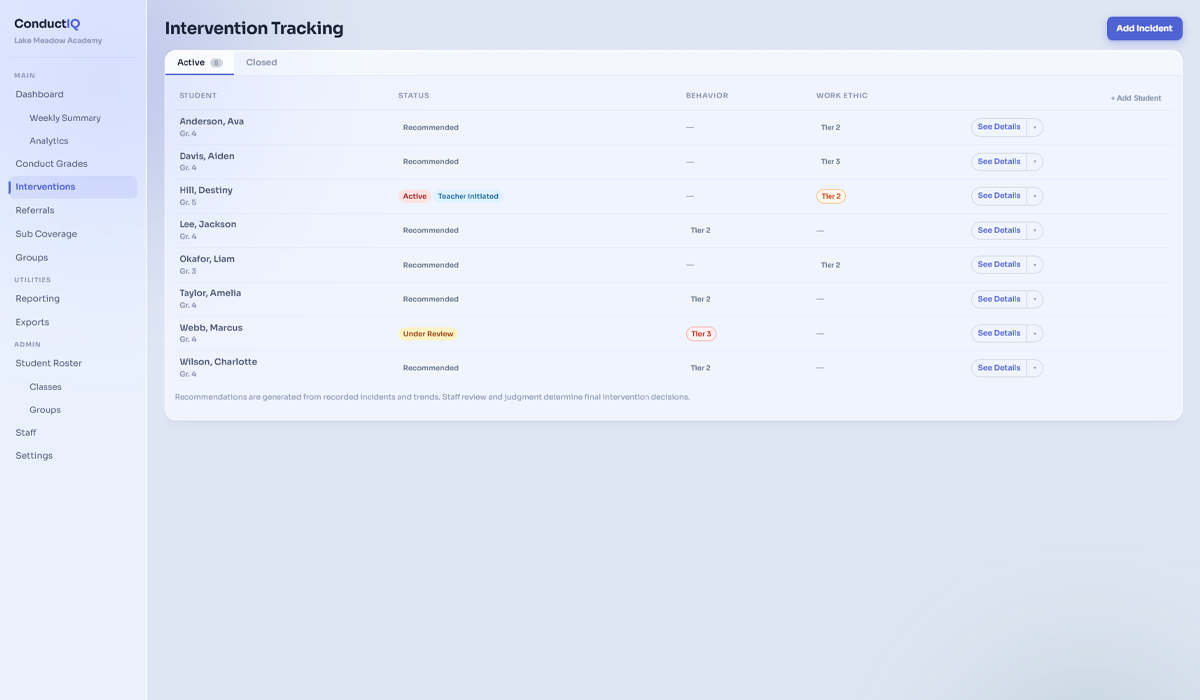
Automated Tier 2 & Tier 3 detection
ConductIQ compares each student's year-to-date mark count against their grade-level cohort — and
automatically places students into Tier 2 (monitor), Tier 3 (at-risk), or Elevated (trending toward a
tier) buckets. No spreadsheet. No manual review. It just tells you who needs attention.
- Cohort-normed — compares within grade level, not just raw counts
- Behavior and Work Ethic tracked independently
- Weekly snapshots run automatically every Friday
- "Elevated" warning for students trending wrong before they hit a tier
- Proactive, balanced, and targeted detection modes
- 20-school-day eligibility gate — no false positives in week one
- Cohort fallback ladder (grade → band → school → org) for small populations
- 6-week trend sparklines for each student
Intervention plans
One plan per student — covering tier, focus areas (Behavior, Work Ethic, or both), rationale, and notes.
Every edit is logged so there's always a clear record of what changed and why.
- Tier 2, Tier 3, and Monitor status levels
- Plan changes auto-logged with timestamp
- Review, Active, Monitoring, and Closed workflow states
Progress monitoring
Enable progress monitoring on any intervention plan and log weekly or biweekly data against configurable
metrics — mark counts, trend, specific code frequency, or custom scales.
- 9 system metrics + custom metrics per school
- Configurable cadence (weekly, biweekly, or custom interval)
- Soft lock mode allows teacher backfill with late reason
- Dashboard card flags overdue progress logs
Notes, meetings & parent contacts
Log intervention notes, meeting records, and every parent contact directly on the student's plan. Notes
are editable within 15 minutes; after that, addendums keep the record accurate without losing the
original.
- Meeting type, attendees, summary, action items, and follow-up date
- 15-minute edit window, then addendum-only
- Parent contacts: method, date, and summary — paper trail for IEP/504
- Visible to all staff with access to the student
PBIS analytics
Aggregate data across the school — weekly trends, code frequency, grade-level breakdowns, and time-of-day
distribution. Useful for admin conversations, professional development, and PBIS reporting.
- Tier distribution by snapshot date
- Weekly trend line (marks vs. merits)
- Top behavior codes ranked by frequency
- Grade-level comparison table
Reports
PDF reports that parents can actually read — and admins can actually use.
Individual & bulk student reports
Weekly PDF conduct summary for a single student — marks, merits, behavior codes, and teacher comments.
Available in modern (branded) or classic (monospace) style as individual PDFs in a ZIP or combined into
one document.
- Sent automatically to parents every Friday
- Behavior and Work Ethic sections clearly separated
- Your school's logo and brand color on every report
Group reports
Coaches and advisors get a clear, up-to-date view of student behavior without chasing down individual
teachers.
- Easy-to-read summaries for each student
- Designed for fast decision making
- Ensure consistent eligibility decisions across programs
Admin & counselor tools
The workflows admins and counselors need, without making teachers do extra work.
Referral workflow
Teachers submit referrals directly from a student's profile. Counselors review, escalate, or dismiss —
with notes attached to the record.
- Pending referral count badge in sidebar
- Referral reason, status, and counselor notes
- Linked to the student's full behavior history
Consequence tracking
Log OSS, ISS, detention, and other consequences directly on a student's profile. Visible to admins and
counselors; flagged in reports for IEP Part B compliance.
- Consequence type, date, duration, and notes
- Cumulative OSS day count with IDEA Part B flag (≥10 days)
- Searchable from the student profile
Audit trail
Every settings change, staff action, and significant event is logged — who did it, when, and what changed.
Visible to admins in Settings → System.
- Before/after values for every settings change
- Filterable by domain, actor, and date range
- System events (snapshots, cron) attributed to "system"
Two-factor authentication
TOTP-based 2FA is required for all admin and counselor accounts, and optionally enforced for teachers.
Keeps student data protected without adding friction to daily use.
- Required for admin/counselor; optional for teachers
- TOTP (Google Authenticator, Authy, etc.)
- Recovery codes generated on setup
Ready to bring ConductIQ to your school?
Accepting schools for the 2026–2027 school year.